
How to recharge metro rapid pass online free?
 Desk Report
| Published: Tuesday, November 25, 2025
Desk Report
| Published: Tuesday, November 25, 2025
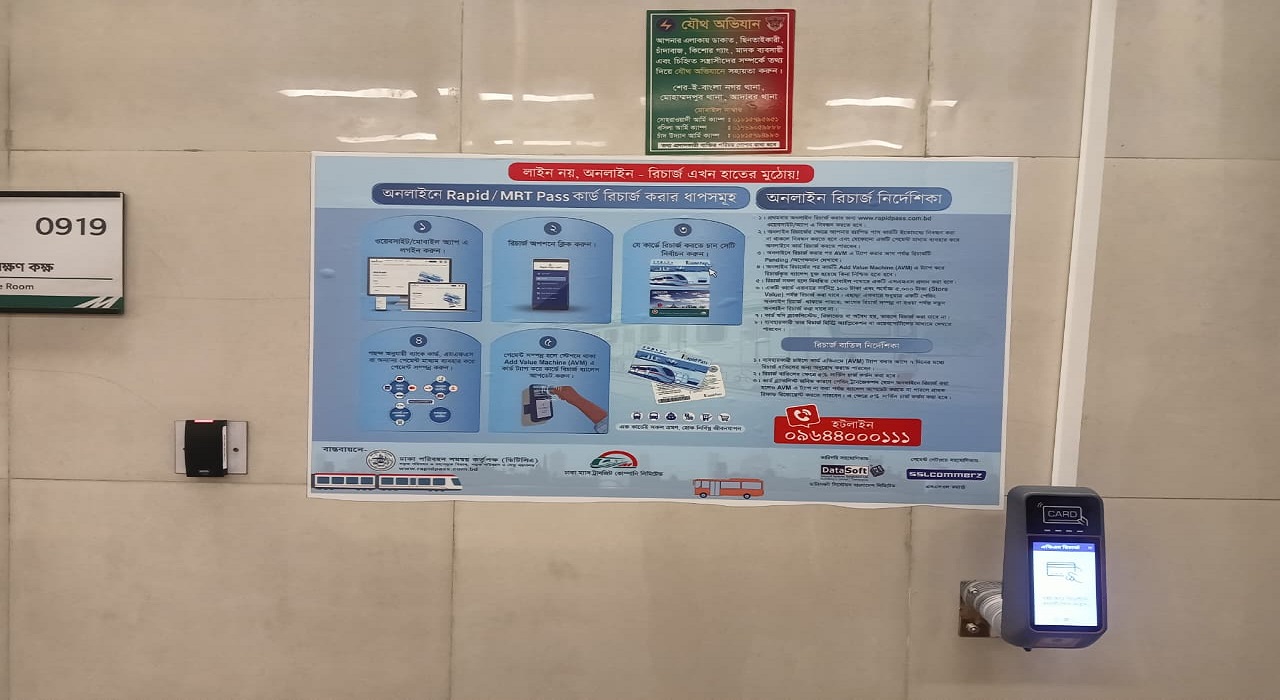
Image: Collected
Metro Rail commuters can now recharge their Rapid Pass and MRT Pass online from today without visiting any station. Users can top up using credit cards, bKash, Nagad, Rocket and all online banking services.
There are no additional charges for using the Add Value Machine (AVM) itself. However, 5% fee applies only if you request a refund or cancel the online recharge within the allowed 7-day window.
It does not
apply to normal recharges and does not apply to using the AVM.
The online recharge system was inaugurated at Agargaon Metro Station this afternoon. Sheikh Moinuddin, Special Assistant to the Chief Adviser for Ministry of Road Transport, Bridges and Railways, attended as chief guest.
Sheikh Moinuddin termed the initiative a significant step in Bangladesh's digital transformation of public transport. "With online recharges, Rapid Pass and MRT Pass users will be able to top up safely, quickly and from any location," he said.
Additional Secretary Nikhil Kumar Das from the Road Transport and Highways Division highlighted digital technology's crucial role in improving efficiency and ensuring good governance.
He noted that online recharge will provide faster, safer and more transparent service. Authorities are working to bring more public transport services onto digital platforms, he added.
DTCA Executive Director Neelima Akhter said the long-awaited service will save passengers' time and promote cashless digital payments. "Digital technology will offer travellers a smart, hassle-free commuting experience," she remarked.
Authorities have installed 32 Add Value Machines across 16 metro stations, two at each location. After completing an online recharge, passengers must tap their card on any AVM to finalize the process. More AVMs will be added soon.
A Metro Rail mobile app for online recharges will launch next month.
How to Recharge
Using the Add Value Machine (AVM)
·
First-time users must register through the
website or app.
·
If the Rapid Pass card is not registered, it
must be registered before online recharge.
·
Recharge online using any available payment
method.
·
Until the card is tapped on an AVM, the online
recharge will show as “pending.”
·
After tapping at the AVM, users can confirm
whether the balance has been added.
·
A confirmation SMS will be sent to the
registered mobile number once recharge is successful.
Recharge
Limits
·
Minimum recharge: Tk 100
·
Maximum recharge: Tk 5,000 per transaction
·
Only one pending recharge can exist at a time.
Restrictions
& Policies
·
Cards that are blacklisted, refunded, or invalid
cannot be recharged.
·
Users can check recharge history from the app or
web portal.
·
A recharge may be canceled within 7 days before
tapping the AVM; a 5% service fee applies.
·
Refund requests due to blacklist-related pending
transactions are also allowed, with a 5% fee deducted.

Make Comment
Login to CommentPopular News


Subscribe to News Letter
Latest News



Weather Outlook
Clear
Dhaka, Bangladesh
Wind: 7.2 kmph · Precip: 0 mm · Pressure: 1015 mb

21.2°C
Mon

21.6°C
Tue

21.6°C
Wed
21.6°C
